
Install a FiveM Server on Linux (Ubuntu)
Guide to setting up a FiveM server using txAdmin on Ubuntu
- 1Step 1
Update System & Install Prerequisites
Update your system and install necessary tools like git, wget, and xz-utils.
sudo apt update && sudo apt upgrade -y sudo apt install xz-utils git wget -y - 2Step 2
Create Server Directory
Create a dedicated directory for your server files.
mkdir -p ~/fivem/server cd ~/fivem/server - 3Step 3
Download Artifacts
Download the latest server artifacts from the official FiveM website. Replace the link below with the latest one.
wget https://runtime.fivem.net/artifacts/fivem/build_proot_linux/master/7294-12403697a5538356943806026823528828352328/fx.tar.xz - 4Step 4
Extract Files
Extract the downloaded archive.
tar xf fx.tar.xz rm fx.tar.xz - 5Step 5
Start Server
Now start the server using the run.sh script. Make sure to run this inside a screen or tmux session.
./run.sh - 6Step 6
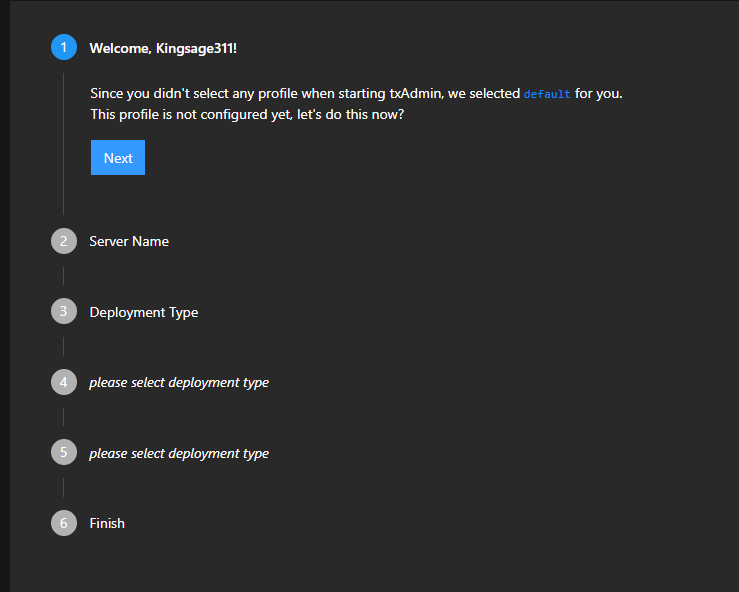
Setup txAdmin
Upon starting, you will see a PIN code and a URL. Open the URL in your browser and enter the code to complete setup.
- 7Step 7
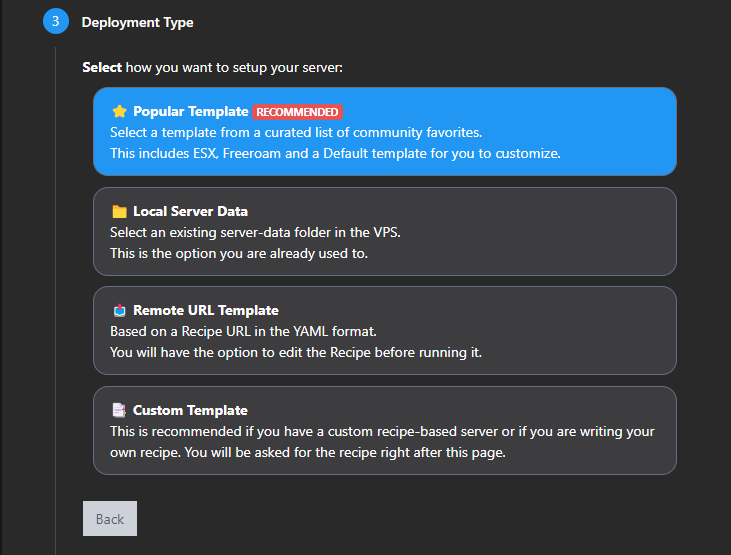
Complete Installation
Follow the txAdmin steps: Select 'Popular Template' then 'ESX' or 'QBCore'.
Frequently asked questions
How do I keep the server running after I close SSH?
Run it inside screen or tmux, or create a systemd service that starts FXServer at boot. A plain SSH session stops the server when you disconnect.
Which ports should I open with ufw?
Allow 30120 for both TCP and UDP for players, and 40120 over TCP for txAdmin: ufw allow 30120/tcp, ufw allow 30120/udp and ufw allow 40120/tcp.
Which Ubuntu version should I use?
A current Ubuntu LTS release. Keep the system updated with apt before installing, and install xz-utils so you can extract the fx.tar.xz artifact.
How do I update the server on Linux?
Stop the server, download the new fx.tar.xz into the same folder and extract it over the old files. Your txData folder and resources stay as they are.
Run this guide on a ready server
Need a server for this guide? FiveM server hosting from SNG comes with txAdmin, OneSync and DDoS protection, and the SNG CDN for FiveM delivers your server files to players from inside Saudi Arabia.
Related FiveM guides
Steps didn't work for you? Our support team is available around the clock.